Choosing software
Procore alternatives for small and mid-size builders, with prices checked on vendor pages
Procore is built for large contractors and the owners, designers and subcontractors around them, and it is priced by the value of the work you build. Many small and mid-size builders need something different: material, labour and job money on a few sites, at a price they can read. This page compares seven alternatives on what they are built for and how they charge. We publish it, and Aaghaz360 is one of the seven, so it says plainly who should stay on Procore.
Part of the guide to what is construction management software
On this page · 12 sections
- Procore alternatives at a glance
- How Procore is priced, and why it is hard to compare
- Who should stay on Procore
- What to compare before you switch
- The alternatives, one by one
- What a team of eight would pay in a year
- What you give up when you leave Procore
- Where Aaghaz360 fits, and where it doesn't
- Switching without disrupting a live project
- How we checked
- Questions people ask
- Sources
Key takeaways
- Procore charges an annual fee by product and by your annual construction volume, with unlimited users. It publishes no price, so you need a quote to compare.
- Stay on Procore if you depend on RFIs, submittals, drawings and specifications shared with designers and subcontractors, or if your clients require it.
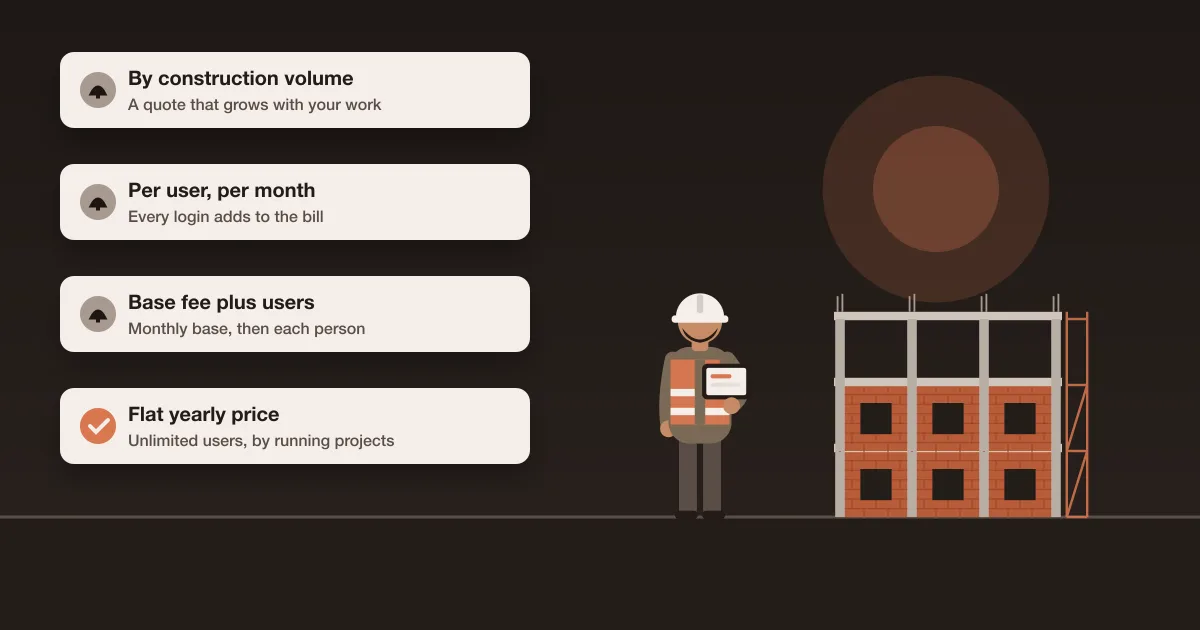
- Alternatives charge in three other ways: per user, a base fee plus users, or a flat price. The model decides what happens to the bill when your team grows.
- Judge alternatives on the problem you have. Drawing-led field tools, residential sales platforms and buying-and-money tools solve different problems.
- Test any alternative on one new project, not a live one, and keep Procore until that project has run a full month.
Procore alternatives at a glance
The Procore alternatives below are the tools that come up again and again in comparisons for small and mid-size builders. Each price is the lowest listed on the vendor's own pricing page when we read it on 30 October 2026. Pages we couldn't open are marked rather than filled with third-party guesses.
| Tool | Built for | How it is priced | Lowest listed price | Free plan or trial |
|---|---|---|---|---|
| Procore (for reference) | General contractors, specialty contractors, owners | Annual fee by product and annual construction volume; unlimited users | No public price | None stated |
| Autodesk Forma (formerly Autodesk Construction Cloud) | Firms working from Autodesk design models | Quote by user, project or account | No public price | None stated |
| Fieldwire by Hilti | Field teams working from drawings and task lists | Per user per month | Pro $39 per user per month, billed annually | Basic $0: 5 users, 3 projects, 100 sheets |
| Contractor Foreman | Small contractors who want many modules | Tiers by number of users | $49 a month billed annually, 1 user | 30-day free trial on annual plans |
| JobTread | Home builders, remodelers, specialty trades | Base fee plus internal users | $199 a month with 1 user, plus $20 per extra user (monthly billing) | No trial stated; 30-day money-back on monthly plans |
| Projul | Residential contractors with a sales pipeline | Tiers by number of users | $199 a month billed annually, up to 3 users | Not stated; demo-led |
| Buildertrend | Residential builders and remodelers | Not verified (pricing page couldn't be read) | Not verified | Not verified |
| Aaghaz360 (publisher) | Builders who buy their own material and run crews | Flat yearly price by running projects; unlimited users | $149 a year, up to 5 running projects | Free: 1 running project, every module, no time limit |
Sources: Procore pricing, Autodesk pricing, Fieldwire pricing, Contractor Foreman pricing, JobTread pricing, Projul pricing and Aaghaz360 pricing. Prices change often. Check the vendor's page on the day you decide.
How Procore is priced, and why it is hard to compare
Procore's pricing page says it charges "an upfront annual fee by product and based upon your Annual Construction Volume (ACV)", which it defines as the aggregate dollar value of the construction work across your projects. It also says: "We'll never charge you for adding more users to Procore." No dollar figure is published (Procore pricing).
That model has a clear upside: you can put every site engineer, subcontractor and client on the system without the bill moving. It has two consequences a smaller builder should think through before a renewal:
- The price follows your turnover, not your use. A year with two large contracts costs more than a year with ten small ones, even if the same five people use the system.
- You can't compare it from a website. Third-party articles quote Procore estimates that range from about $10,000 to over $200,000 a year and contradict each other, so we don't repeat them. The only number that means anything is a written quote for your volume and products.
When you ask for that quote, ask which products are included, how volume is measured and when, what happens at renewal if your volume rises or falls, and whether a multi-year term changes the rate. Then compare it with the yearly cost of an alternative at your real team size, worked out below.
Who should stay on Procore
Procore is a good product for the job it was built for. Its project management page lists RFIs, submittals, drawings, specifications, transmittals, meetings, punch lists, schedules, daily logs and timecards, and it connects to hundreds of other tools through an app marketplace, including Microsoft Project and Oracle Primavera P6 (Procore project management). Moving away makes little sense if:
- Your projects run on formal RFIs and submittals with architects, engineers and consultants.
- Your clients or owners require their contractors to work in Procore.
- You rely on integrations with your scheduling or accounting systems that an alternative doesn't have.
- Your volume is large enough that the fee is a small share of what each project earns.
The builders who most often look for Procore alternatives are a different group: house builders, small developers and civil or renovation contractors who buy their own material, employ or hire their own crews, and run a handful of sites. Their losses come from short deliveries, unapproved purchases, wage disputes and costs found too late, not from a missing submittal.
What to compare before you switch
Vendor lists compare star ratings and feature counts. These are the questions that change the decision for a small or mid-size builder:
| Question | Why it matters |
|---|---|
| How is it priced, and who counts as a user? | Per-user pricing grows with every site engineer and storekeeper; some tools don't charge for clients or suppliers |
| Is it built around drawings, sales or buying? | Field tools are strong on drawings and tasks, residential platforms on sales and selections, others on purchasing and money |
| Does purchasing go past the purchase order? | Material requests, approvals, supplier quotes, partial deliveries, site stock and bill matching are where materials money leaks |
| How is labour paid? | Hourly timesheets, daily-wage crews and subcontract work need different records |
| Which features are in which plan? | Budgets, RFIs, purchase orders or daily logs are sometimes only in the top tier |
| What stays in accounting? | Decide whether the tool keeps the ledger or hands figures to your accountant |
| Will the site use it on a phone? | If the site doesn't enter the day, every report is empty |
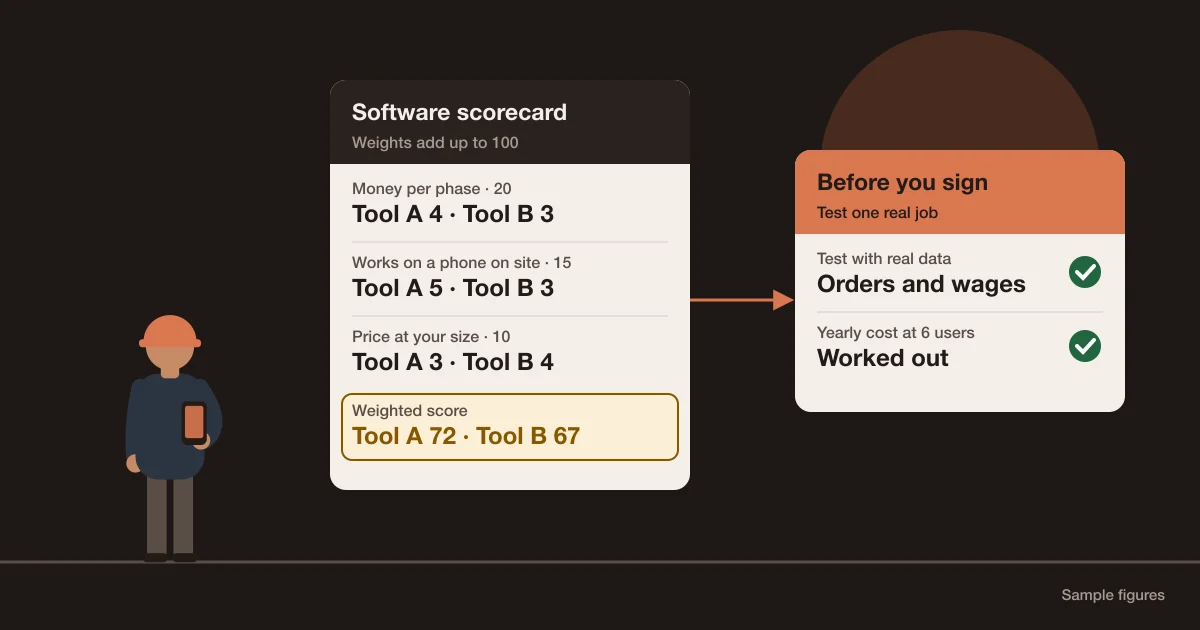
The scorecard in the guide to construction software for small builders turns these into weighted scores you can use on any shortlist, and what construction management software is explains how the modules fit together.
The alternatives, one by one
Each entry says what the tool is built for, how its own pricing page describes the price, and what to check in a demo. Listed in order from enterprise to small-builder tools.
Autodesk Forma (formerly Autodesk Construction Cloud)
Autodesk's construction platform, now sold as Autodesk Forma in bundles for model management, preconstruction and construction operations. Autodesk's page offers "flexible user, project, and account-based pricing" and publishes no prices (Autodesk pricing). It is the closest like-for-like replacement for a large contractor, and it suits firms whose designers already work in Autodesk models. Check in the demo: which bundles you need, and how users are counted.
Fieldwire by Hilti
A field tool built around drawings, plans and task lists. It is priced per user per month, billed annually: Pro $39, Business $64 and Business Plus $89, plus a free Basic plan for up to 5 users, 3 projects and 100 sheets. RFIs, submittals, change orders and budgets are in Business Plus (Fieldwire pricing). It suits a site team whose main problem is working from the right drawing. Check in the demo: whether the plan you can afford includes the money features you need.
Contractor Foreman
A broad, low-priced all-in-one for small contractors. Annual plans run from $49 a month for one user to $332 a month for unlimited users ($588 to $3,984 a year), with tiers for up to 3, 8 and 15 users. Annual plans start with a 30-day free trial, and the Plus, Pro and Unlimited annual plans carry a 100-day money-back guarantee. Its page lists purchase orders, change orders, RFIs and submittals among its features (Contractor Foreman pricing). Check in the demo: which plan each feature you need is in, since the pricing page doesn't map them.
JobTread
Aimed at home builders, remodelers and specialty trades. It costs $199 a month including one internal user, then $20 a month for each internal user from the second to the tenth on monthly billing, or $16 on annual billing. Customer and vendor portal users are unlimited, and JobTread says all features are included. There is no free trial on the page; monthly plans have a 30-day money-back guarantee (JobTread pricing). Check in the demo: how site staff are counted, since every internal user is charged.
Projul
A tool for residential contractors that covers CRM, estimating and scheduling. Annual plans run from $199 a month for up to 3 users to $1,199 a month for unlimited users ($2,388 to $14,388 a year). Its page puts purchase orders and daily logs in the top Pro plan and job costing from the Core+ plan up (Projul pricing). Check in the demo: whether the plan you'd buy includes purchase orders and daily logs.
Buildertrend
A long-established platform for residential builders and remodelers. Its pricing page couldn't be read when we checked, so no price is given here; ask for a written quote. Buildertrend has absorbed CoConstruct, whose home page now promotes Buildertrend's specs, selections, task management, client updates and budgeting, and says the move "is entering its final phase" (CoConstruct). For that reason CoConstruct isn't listed as a separate option.
Aaghaz360
Construction management software for builders and contractors who buy their own material and run their own crews. It is priced per company by running projects, with unlimited users: Free for one running project with every module and no time limit, then Starter $149, Business $249 and Unlimited $499 a year (pricing). Its strength is the buying-and-money trail from a site's material request to a paid bill, covered with its limits in where Aaghaz360 fits below.
What a team of eight would pay in a year
Headline prices hide the model. Here is the same builder priced on each tool: eight people with a login (three in the office, five on site) and four projects running. It uses the lowest plan that fits, at the list prices above. It compares price only; the tools don't do the same jobs.
| Tool and plan | How it is worked out | Per year |
|---|---|---|
| Procore | Quote by product and construction volume | Quote only |
| Fieldwire Pro | 8 users × $39 × 12 months | $3,744 |
| Fieldwire Business Plus (adds RFIs, submittals, change orders, budgets) | 8 users × $89 × 12 months | $8,544 |
| Contractor Foreman Plus | Annual plan for up to 8 users | $1,997 |
| JobTread, monthly billing | ($199 with 1 user + 7 users × $20) × 12 months | $4,068 |
| Projul Core | Annual plan for up to 10 users | $4,788 |
| Projul Pro (adds purchase orders and daily logs) | Annual plan, unlimited users | $14,388 |
| Aaghaz360 Starter | Up to 5 running projects, unlimited users | $149 |
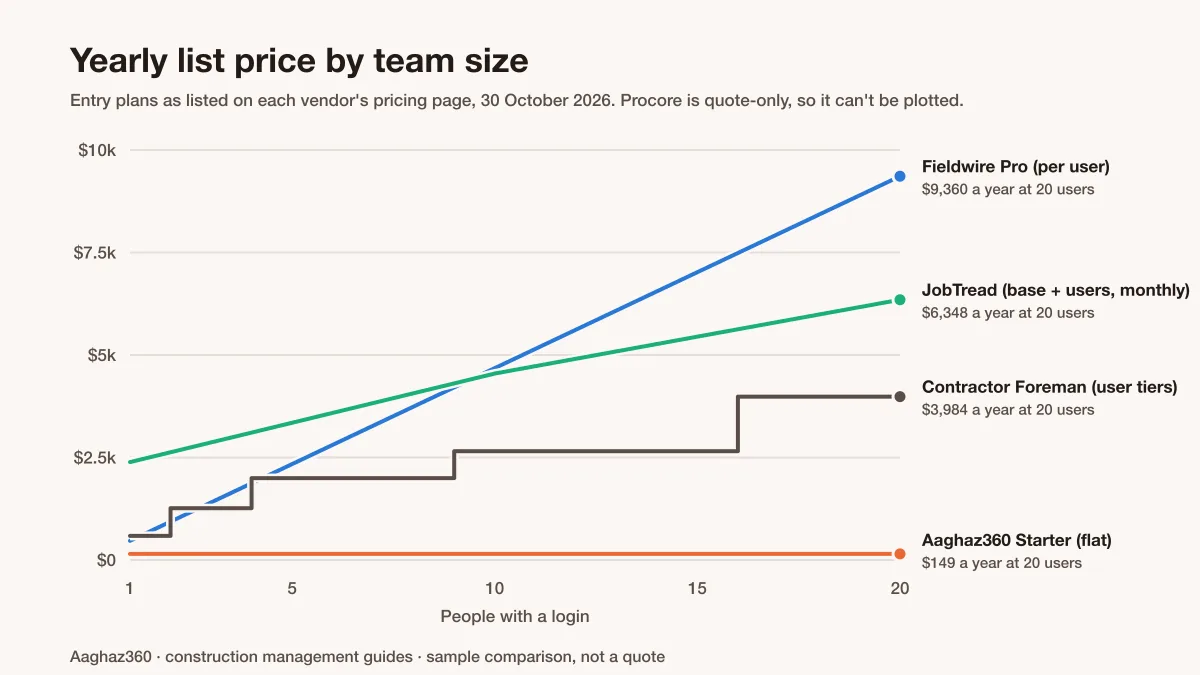
The gap between the lines is the cost of putting the site team on the system, which is where the data comes from. If you'd keep site staff off a per-user tool to save money, count that as a cost too: someone in the office will be typing up their notes. The small-builders guide works through the same sums at 6 and 10 users.
What you give up when you leave Procore
Be clear about this before you switch. Most lighter tools, Aaghaz360 included, don't match Procore on:
- Formal RFIs, submittals, transmittals and specifications exchanged with designers and consultants.
- Drawing management with markups and version control across a large project team.
- Detailed scheduling, and integrations with tools such as Microsoft Project and Primavera P6.
- An app marketplace with hundreds of integrations.
- Being the system your clients already expect.
If those matter less to you than materials, labour and job cost, a lighter tool usually gives you more of what you use for less. If they matter more, keep Procore and solve the materials problem with a better process; the construction material tracking checkpoints work in any system.
Where Aaghaz360 fits, and where it doesn't
Aaghaz360 fits a builder whose money goes on material and labour across several sites. A site engineer requests material from a phone; the owner approves by amount; suppliers quote through a private link; the purchase order, each partial delivery with its photo, the site store and the supplier's bill sit on one trail, and the bill is matched to the order and delivery before it is paid. Daily-wage crews are paid from recorded attendance, subcontractors have a contract with advances and retention, and each phase shows budget, committed and actual cost.
It doesn't fit if you need RFIs, submittals or drawing markup, a general ledger or tax filing, payroll for salaried staff, scheduling with dependencies, or integrations with other systems. It runs in the browser and installs on phones from there; there is no app-store app. A client can be given a view of their own project's progress, photos and payments, but there is no separate client portal.
Switching without disrupting a live project
- 1Don't move a running job.
Start the next new project in the alternative and let current projects finish where they are. - 2Export what you'll need later.
Before your Procore term ends, export documents, photos, cost reports and logs for every project, and check you can open them. - 3Set up the new project properly.
Phases, a budget per phase, approval limits, suppliers and the team by role. Half a set-up produces half the data. - 4Run one full month.
Daily logs, at least one full purchase from request to paid bill, and one pay run. Then compare its numbers with what you'd have known before. - 5Decide at renewal, not before.
Give yourself the month's evidence before the Procore renewal date, not after.
How we checked
Every price and plan on this page was read on the vendor's own pricing page on 30 October 2026, and every quote is in the vendor's words. Buildertrend's pricing page returned an error, so it has no price here. Third-party estimates of Procore's cost are left out because they contradict each other and none shows its method. CoConstruct isn't listed because it is moving its customers to Buildertrend. Prices change: if a vendor's page differs from this one, the vendor's page is right.
Questions people ask
How much does Procore cost?
Procore doesn't publish a price. Its pricing page says it charges an upfront annual fee by product, based on your annual construction volume (the total value of the work across your projects), and doesn't charge for adding users. Ask for a written quote for your volume and the products you need.
Is Procore worth it for a small builder?
It is if you rely on RFIs, submittals and drawings shared with designers and subcontractors, or your clients require it. If your main problems are materials, labour and job cost on a few sites, a lighter tool usually covers what you use for a lower and more predictable price.
Is there a free alternative to Procore?
Yes, with limits. Fieldwire's Basic plan is free for up to 5 users, 3 projects and 100 sheets. Aaghaz360's Free package runs one project at a time with every module and unlimited users, with no time limit. Free plans are best for testing one real job before you pay.
What is the cheapest alternative to Procore?
It depends on your team size and pricing model. For 8 users and 4 running projects at list prices on 30 October 2026, the yearly cost ranged from $149 (Aaghaz360 Starter) to $1,997 (Contractor Foreman Plus), $3,744 (Fieldwire Pro) and $4,068 (JobTread, monthly billing). Compare the features each plan includes, not only the price.
Who are Procore's main competitors?
For large contractors, Autodesk Forma (formerly Autodesk Construction Cloud) is the closest like-for-like option. For field teams working from drawings, Fieldwire. For residential builders, Buildertrend and JobTread. For small contractors who want many modules at a low price, Contractor Foreman, and for buying, stores and labour across several sites, Aaghaz360.
Is Procore free for subcontractors?
Procore says it doesn't charge for adding users and that its unlimited users include collaborators such as clients, subcontractors and vendors. A subcontractor invited to a contractor's Procore project works under that contractor's account. To run your own projects in Procore, ask Procore for a quote.